How to Add Database Migration Checks to Your CI/CD Pipeline
Code review catches logic bugs, linting catches style issues, and type checking catches type errors. But what catches dangerous database migrations? Most teams ship migration SQL without any automated safety checks. Here is how to fix that.
Why CI Checks for Migrations
Database migrations have a unique risk profile compared to application code:
- Irreversible by default. A deployed app rollback takes seconds. A schema change rollback can take hours or be impossible (data loss from DROP COLUMN).
- Production-specific risk. A migration that runs in 100ms on dev can take 10 minutes on production with 50M rows.
- Cascading failures. A single bad lock can queue all queries, exhaust connection pools, and take down the entire application.
- Low review expertise. Most engineers review SQL migrations less carefully than application code because the risks are not obvious.
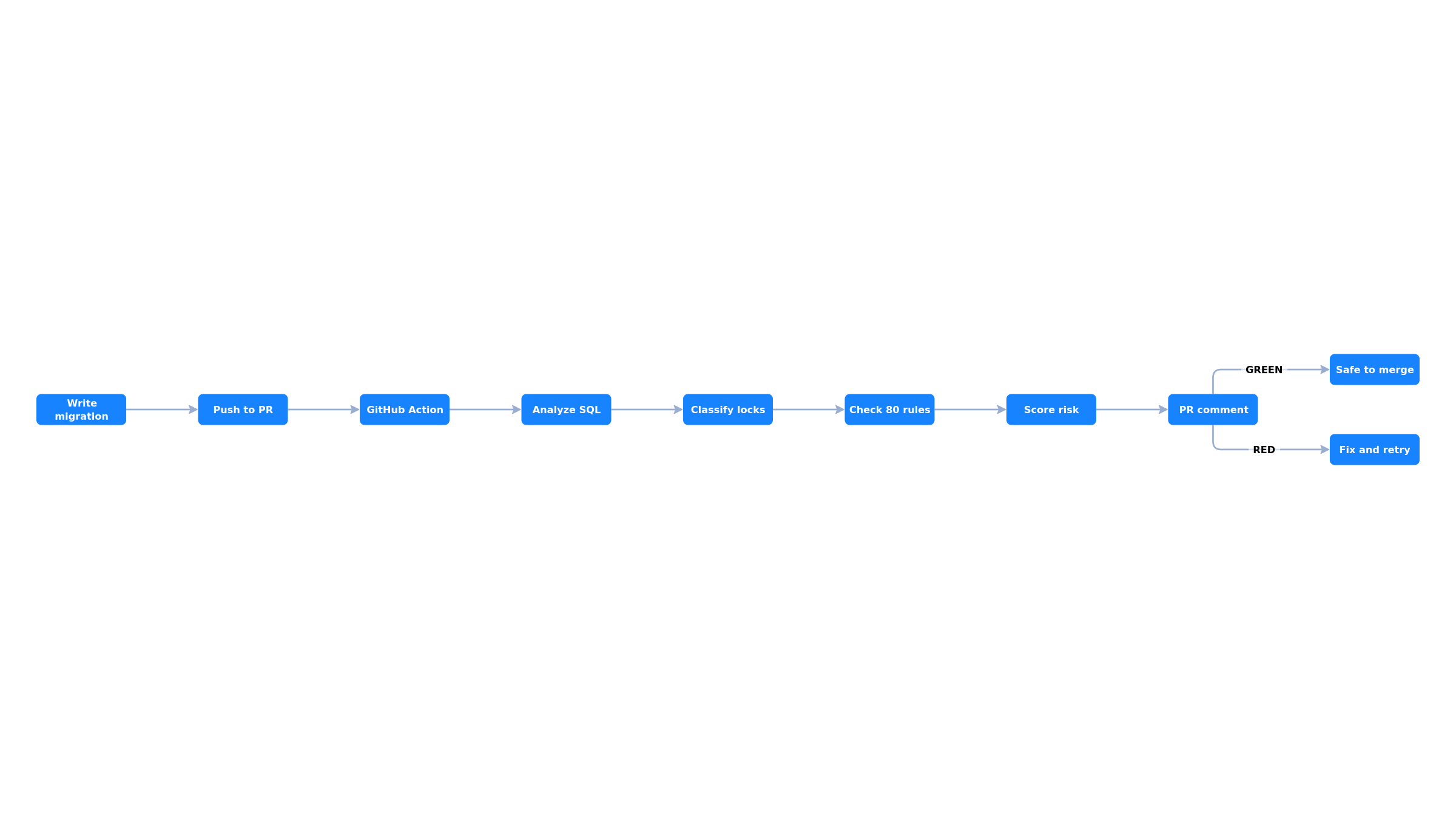
Automated CI checks solve these problems by catching known-dangerous patterns before the migration is merged. The check runs in seconds, requires no database connection, and provides actionable feedback directly in the pull request.
What to Check
An effective migration linter should catch these categories of issues:
Lock safety
- CREATE INDEX without CONCURRENTLY (blocks writes)
- Missing lock_timeout before DDL (can queue all traffic)
- ADD COLUMN with volatile DEFAULT (full table rewrite)
- SET NOT NULL without CHECK pattern (ACCESS EXCLUSIVE scan)
- UNIQUE constraint without USING INDEX (builds index under ACCESS EXCLUSIVE)
- Foreign key without NOT VALID (scans both tables under lock)
Data safety
- DROP TABLE, DROP COLUMN (irreversible data loss)
- TRUNCATE CASCADE (cascading data deletion)
- Data type narrowing (silent data truncation)
- DROP NOT NULL on columns that should never be null
Best practices
- Prefer TEXT over VARCHAR (no performance difference in PostgreSQL)
- Prefer BIGINT over INT for primary keys (avoid future overflow)
- Prefer TIMESTAMPTZ over TIMESTAMP (timezone-aware)
- Prefer IDENTITY over SERIAL (SQL standard, better semantics)
- Always name indexes explicitly (for reliable migrations later)
GitHub Actions Setup
The simplest way to add migration checks to a GitHub repository. Create a workflow file:
# .github/workflows/migration-check.yml
name: Migration Safety Check

on:
  pull_request:
    paths:
      - 'migrations/**'
      - 'db/migrate/**'
      - 'prisma/migrations/**'

jobs:
  check:
    runs-on: ubuntu-latest
    steps:
      - uses: actions/checkout@v4

      - uses: mickelsamuel/migrationpilot@v1
        with:
          migration-path: "migrations/*.sql"
          fail-on: critical
This workflow runs whenever a PR modifies files in the migrations directory. It analyzes every SQL file, posts a safety report as a PR comment, and fails the check if any critical violations are found.
Customizing the check
# More detailed configuration
- uses: mickelsamuel/migrationpilot@v1
  with:
    # Path to migration files (glob pattern)
    migration-path: "migrations/*.sql"

    # Fail the check on "critical" or "warning" violations
    fail-on: critical

    # Exclude specific rules (comma-separated)
    # e.g., if you intentionally want DROP TABLE in a cleanup migration
    exclude: "MP026,MP017"

    # PostgreSQL version for version-specific advice
    pg-version: "16"

    # Output SARIF for GitHub Code Scanning integration
    sarif-file: "results.sarif"
SARIF integration with GitHub Code Scanning
For richer integration, MigrationPilot can output SARIF (Static Analysis Results Interchange Format), which GitHub Code Scanning understands natively. Violations appear as inline annotations directly in the PR diff:
# .github/workflows/migration-check.yml
name: Migration Safety Check

on:
  pull_request:
    paths: ['migrations/**']

jobs:
  check:
    runs-on: ubuntu-latest
    permissions:
      contents: read
      security-events: write  # Required for SARIF upload

    steps:
      - uses: actions/checkout@v4

      - uses: mickelsamuel/migrationpilot@v1
        with:
          migration-path: "migrations/*.sql"
          fail-on: critical
          sarif-file: "migrationpilot.sarif"

      - uses: github/codeql-action/upload-sarif@v3
        if: always()
        with:
          sarif_file: "migrationpilot.sarif"
GitLab CI Setup
# .gitlab-ci.yml
migration-check:
  image: node:22-slim
  stage: test
  rules:
    - changes:
        - migrations/*.sql
  script:
    - npx migrationpilot check migrations/*.sql --fail-on critical
  allow_failure: false
Bitbucket Pipelines Setup
# bitbucket-pipelines.yml
pipelines:
  pull-requests:
    '**':
      - step:
          name: Migration Safety Check
          image: node:22-slim
          script:
            - npx migrationpilot check migrations/*.sql --fail-on critical
          condition:
            changesets:
              includePaths:
                - "migrations/**"
Generic CI (Any System)
MigrationPilot works as a plain CLI tool, so it runs anywhere Node.js is available:
# Install and run
npm install -g migrationpilot

# Check migrations — exits with code 2 on critical violations
migrationpilot check migrations/*.sql --fail-on critical

# Or use npx (no install needed)
npx migrationpilot check migrations/*.sql --fail-on critical

# Output formats for different CI systems
migrationpilot check migrations/*.sql --format json      # Machine-readable
migrationpilot check migrations/*.sql --format sarif      # Code scanning
migrationpilot check migrations/*.sql --format markdown   # Wiki/docs
migrationpilot check migrations/*.sql --quiet             # gcc-style one-liner
Framework-Specific Migration Paths
Different migration frameworks store SQL files in different locations. Here are the common paths:
| Framework | Migration Path |
|---|---|
| Flyway | src/main/resources/db/migration/*.sql |
| Liquibase | src/main/resources/db/changelog/*.sql |
| Rails | db/migrate/*.rb (use schema.sql) |
| Django | */migrations/*.py (use sqlmigrate) |
| Alembic | alembic/versions/*.py |
| Prisma | prisma/migrations/*/migration.sql |
| Knex | migrations/*.js (pipe through knex) |
| goose | migrations/*.sql |
| dbmate | db/migrations/*.sql |
| Sqitch | deploy/*.sql |
ORM frameworks (Django, Rails, Alembic)
For frameworks that generate SQL from ORM code (Django, Rails, Alembic), you can pipe the generated SQL through stdin:
# Django: Generate SQL from migration, then analyze
python manage.py sqlmigrate myapp 0042 | npx migrationpilot analyze --stdin

# Alembic: Generate SQL from revision
alembic upgrade head --sql | npx migrationpilot analyze --stdin

# Rails: Use schema.sql format
# Set config.active_record.schema_format = :sql in application.rb
# Then analyze the generated SQL file
npx migrationpilot analyze db/structure.sql
Pre-Commit Hook (Local Check)
For even earlier feedback, add a pre-commit hook that runs before code leaves the developer's machine:
# Install the pre-commit hook
npx migrationpilot hook install

# Or add to your existing husky setup
# .husky/pre-commit
npx migrationpilot check migrations/*.sql --fail-on critical --quiet
Configuration File
For project-wide settings, create a configuration file in your repository root:
# .migrationpilotrc.yml
# Use a built-in preset as a starting point
extends: ci

# PostgreSQL version (affects version-specific advice)
pgVersion: 16

# Override severity for specific rules
rules:
  MP026:
    severity: warning  # Allow DROP TABLE with a warning
  MP037:
    severity: off      # Don't enforce TEXT over VARCHAR

# Exclude rules globally
exclude:
  - MP015  # Allow SERIAL (team preference)
What the PR Comment Looks Like
When running as a GitHub Action, MigrationPilot posts a detailed safety report as a PR comment. The comment includes:
- Overall risk score (RED / YELLOW / GREEN)
- Per-statement lock analysis (which lock each DDL acquires)
- Violation details with explanations of why each pattern is dangerous
- Safe alternative SQL you can copy-paste
- Auto-update on each push (no comment spam)
The comment is automatically updated on each push to the PR branch, so there is no comment spam. If all violations are resolved, the comment shows a green checkmark.
Gradual Adoption Strategy
You do not need to fix every existing migration to start using CI checks. A practical adoption strategy:
- Week 1: Warning mode. Add the check with
allow_failure: true(GitLab) or nofail-on(GitHub Action). Team sees reports but is not blocked. - Week 2: Block critical only. Set
fail-on: criticalto block the most dangerous patterns (missing CONCURRENTLY, table rewrites). - Month 2: Block warnings. Once the team is comfortable, switch to
fail-on: warningto enforce best practices too. - Ongoing: Customize rules. Tune severity overrides and exclusions based on your team's conventions.
Get Started
Adding migration safety checks to CI takes less than a minute. MigrationPilot is open-source (MIT), runs 112 safety rules in under a second, and requires no database connection. It works as a CLI, GitHub Action, GitLab CI step, or Node.js library.
# Try it now on your existing migrations
npx migrationpilot analyze migrations/*.sql