The Complete Guide to PostgreSQL Lock Types for Schema Changes
If you run DDL against a production PostgreSQL database without understanding locks, you will cause an outage. That is not a maybe. This guide covers every lock level, which statements acquire which locks, and what that means for your running application.
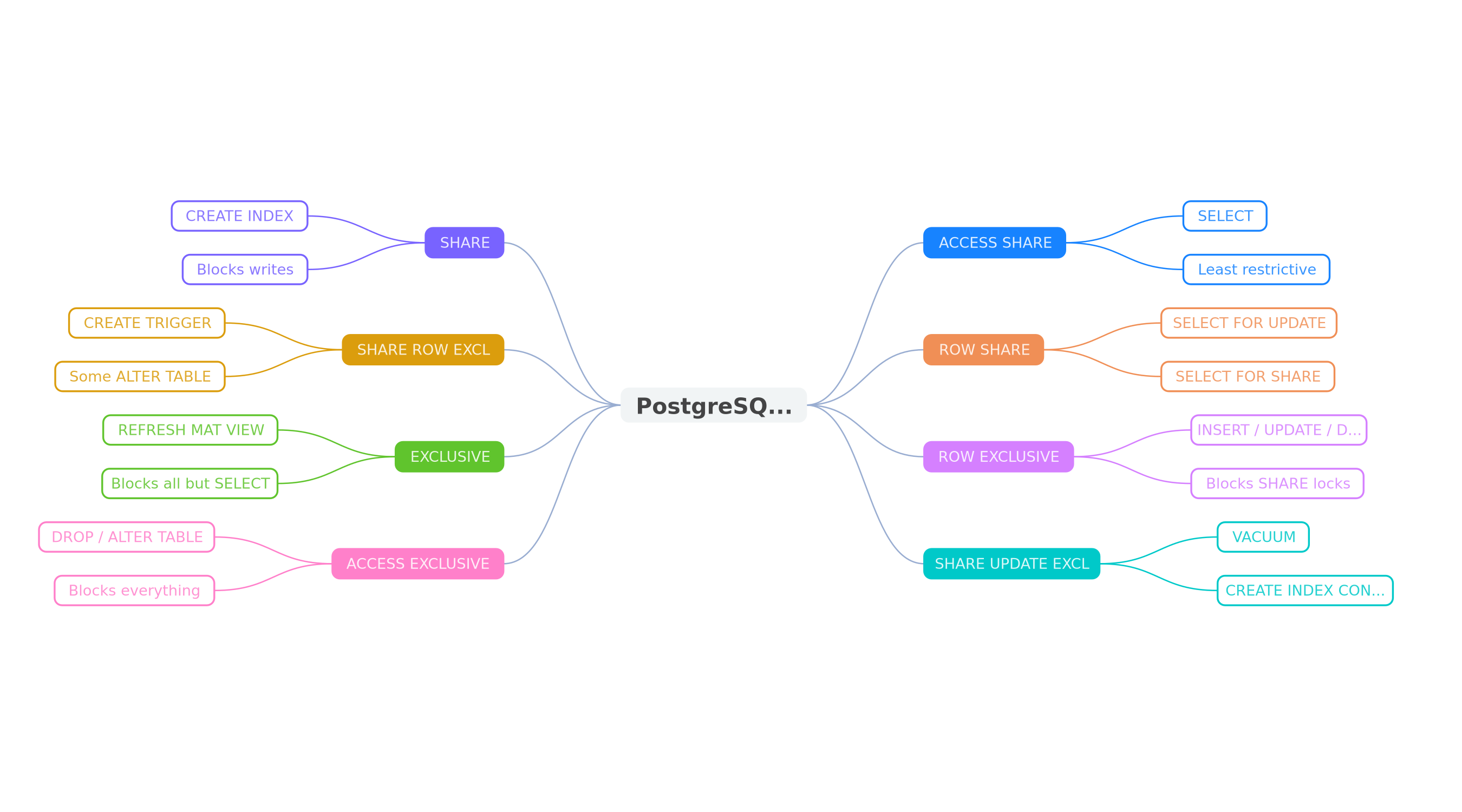
PostgreSQL Lock Levels: The Full Hierarchy
PostgreSQL has eight table-level lock modes, ordered from least restrictive to most restrictive. Two locks conflict when one would violate the guarantees of the other. Understanding this hierarchy is the foundation of safe schema changes.
| Lock Level | Blocks Reads? | Blocks Writes? | Acquired By |
|---|---|---|---|
| ACCESS SHARE | No | No | SELECT |
| ROW SHARE | No | No | SELECT FOR UPDATE/SHARE |
| ROW EXCLUSIVE | No | No | INSERT, UPDATE, DELETE |
| SHARE UPDATE EXCLUSIVE | No | No | VACUUM, CREATE INDEX CONCURRENTLY, ALTER TABLE (some) |
| SHARE | No | Yes | CREATE INDEX (without CONCURRENTLY) |
| SHARE ROW EXCLUSIVE | No | Yes | CREATE TRIGGER, some ALTER TABLE |
| EXCLUSIVE | No | Yes | REFRESH MATERIALIZED VIEW CONCURRENTLY |
| ACCESS EXCLUSIVE | Yes | Yes | DROP, TRUNCATE, most ALTER TABLE, VACUUM FULL, CLUSTER |
The key insight: ACCESS EXCLUSIVE is the only lock that blocks reads. Everything else allows SELECT queries to continue. But anything from SHARE upward blocks writes (INSERT, UPDATE, DELETE), which is still devastating for a production application.
ACCESS SHARE: The Harmless Lock
Every SELECT statement acquires an ACCESS SHARE lock. It only conflicts with ACCESS EXCLUSIVE. This is why you can run queries while most DDL is happening, but a DROP TABLE will block all your reads.
ACCESS SHARE is automatically released at the end of the statement (or transaction if inside a transaction block). You never need to worry about this lock in practice.
SHARE UPDATE EXCLUSIVE: The Safe DDL Lock
This lock is the sweet spot for online operations. It self-conflicts (you cannot run two concurrent operations that both need it) but does not block reads or writes. Operations that acquire this lock include:
VACUUM(without FULL)CREATE INDEX CONCURRENTLYALTER TABLE VALIDATE CONSTRAINTALTER TABLE SET STATISTICSREINDEX CONCURRENTLY(PG 12+)
This is why CREATE INDEX CONCURRENTLY is the gold standard for adding indexes to production tables. It takes longer, but your application keeps running without any interruption.
SHARE: The Write-Blocking Lock
A regular CREATE INDEX (without CONCURRENTLY) acquires a SHARE lock. This blocks all INSERT, UPDATE, and DELETE operations on the table for the entire duration of the index build.
-- This blocks all writes for the entire index build duration
-- On a 100M row table, this could be 10+ minutes
CREATE INDEX idx_users_email ON users (email);

-- This is the safe alternative — only blocks other DDL
CREATE INDEX CONCURRENTLY idx_users_email ON users (email);
On a small table (under 100K rows), the difference is negligible. On a 50M row table, a regular CREATE INDEX might take several minutes, and every write to that table queues up behind it. Connection pools fill up, application requests time out, and your users see errors.
ACCESS EXCLUSIVE: The Total Lockout
ACCESS EXCLUSIVE is the most dangerous lock in PostgreSQL. It blocks everything: reads, writes, and all other lock types. Nothing can touch the table until the lock is released.
These operations acquire ACCESS EXCLUSIVE:
DROP TABLETRUNCATEALTER TABLE ADD COLUMN ... DEFAULT (volatile)ALTER TABLE ALTER COLUMN TYPEALTER TABLE SET NOT NULL(without CHECK pattern)ALTER TABLE ADD CONSTRAINT ... UNIQUE(without USING INDEX)VACUUM FULLCLUSTERLOCK TABLE
The Lock Queue Problem
Here is the part that surprises most engineers: PostgreSQL lock acquisition is a FIFO queue. If your DDL statement is waiting for an ACCESS EXCLUSIVE lock, every subsequent query that needs a conflicting lock queues up behind it.
Consider this scenario:
- A long-running analytics query holds ACCESS SHARE on the
userstable - Your migration runs
ALTER TABLE users SET NOT NULL ...which needs ACCESS EXCLUSIVE - The ALTER waits behind the analytics query
- Every new SELECT on
usersqueues behind the ALTER - Your connection pool fills up within seconds
- Application outage
This is why SET lock_timeout is essential. If you set a lock timeout of 5 seconds, the ALTER will fail fast instead of queuing indefinitely:
-- Always set a lock_timeout before DDL in production
SET lock_timeout = '5s';
ALTER TABLE users ALTER COLUMN email SET NOT NULL;

-- If the lock cannot be acquired within 5 seconds,
-- PostgreSQL raises: ERROR: canceling statement due to lock timeout
Lock Conflicts: Which Locks Block Which
The lock conflict matrix is not obvious. Two locks conflict only when one would violate the guarantees the other provides. Here are the most important conflicts to remember:
- ACCESS EXCLUSIVE conflicts with everything, including ACCESS SHARE (SELECT)
- SHARE conflicts with ROW EXCLUSIVE (INSERT/UPDATE/DELETE), so CREATE INDEX blocks writes
- SHARE UPDATE EXCLUSIVE only conflicts with itself, SHARE, and the EXCLUSIVEs
- ROW EXCLUSIVE does not conflict with itself (concurrent writes are fine) but conflicts with SHARE and above
Common DDL Statements and Their Lock Types
Here is a practical reference for the DDL you are most likely to run in migrations:
-- ACCESS EXCLUSIVE (blocks everything)
ALTER TABLE users ADD COLUMN status TEXT DEFAULT 'active';  -- PG < 11
ALTER TABLE users ALTER COLUMN age TYPE bigint;
ALTER TABLE users ADD CONSTRAINT uniq UNIQUE (email);
DROP TABLE old_users;
TRUNCATE users;
VACUUM FULL users;
CLUSTER users USING idx_id;

-- SHARE (blocks writes, allows reads)
CREATE INDEX idx_email ON users (email);

-- SHARE UPDATE EXCLUSIVE (blocks nothing important)
CREATE INDEX CONCURRENTLY idx_email ON users (email);
ALTER TABLE users VALIDATE CONSTRAINT chk_email;
VACUUM users;

-- SHARE ROW EXCLUSIVE (blocks writes)
ALTER TABLE users ADD CONSTRAINT fk_org
  FOREIGN KEY (org_id) REFERENCES orgs(id) NOT VALID;

-- ROW EXCLUSIVE (normal DML — no DDL concern)
INSERT INTO users ...
UPDATE users SET ...
DELETE FROM users ...
Practical Guidelines
1. Always set lock_timeout
Before any DDL in production, set a lock_timeout. Five seconds is a good default. If the lock cannot be acquired in that time, it is better to fail and retry than to queue up all traffic.
2. Use CONCURRENTLY whenever possible
CREATE INDEX, DROP INDEX, REINDEX, and REFRESH MATERIALIZED VIEW all have CONCURRENTLY variants. They take longer but do not block reads or writes. Use them in production without exception.
3. Avoid ACCESS EXCLUSIVE unless necessary
Most ACCESS EXCLUSIVE operations have safer alternatives. Adding NOT NULL can use the CHECK pattern. Adding a UNIQUE constraint can use CREATE UNIQUE INDEX CONCURRENTLY + ADD CONSTRAINT USING INDEX. Column type changes can use expand-contract with a new column.
4. Keep transactions short
Locks are held until the end of the transaction. If you wrap multiple DDL statements in a single transaction, you hold the most restrictive lock for the entire duration. Split large migrations into separate transactions when possible.
How to Check Current Locks
You can inspect active locks with this query:
SELECT
  l.locktype,
  l.relation::regclass AS table_name,
  l.mode,
  l.granted,
  l.pid,
  a.query,
  a.state,
  age(now(), a.query_start) AS duration
FROM pg_locks l
JOIN pg_stat_activity a ON l.pid = a.pid
WHERE l.relation IS NOT NULL
  AND a.pid <> pg_backend_pid()
ORDER BY a.query_start;
And to see blocked queries:
SELECT
  blocked.pid AS blocked_pid,
  blocked.query AS blocked_query,
  blocking.pid AS blocking_pid,
  blocking.query AS blocking_query,
  age(now(), blocked.query_start) AS waiting_duration
FROM pg_stat_activity blocked
JOIN pg_locks bl ON blocked.pid = bl.pid AND NOT bl.granted
JOIN pg_locks l ON bl.relation = l.relation
  AND bl.locktype = l.locktype AND l.granted
JOIN pg_stat_activity blocking ON l.pid = blocking.pid
WHERE blocked.pid <> blocking.pid;
Automate Lock Analysis
Memorizing lock types is error-prone. Tools can catch lock issues before they reach production. MigrationPilot analyzes your migration SQL and reports the exact lock type each statement will acquire, flags dangerous patterns like missing CONCURRENTLY or lock_timeout, and suggests safe alternatives. It runs as a CLI, GitHub Action, or Node.js library with 112 safety rules.
npx migrationpilot analyze migrations/002_add_index.sql